Thursday, April 22, 2021

Rush and Female Engagement: A Scientific Study


Kevin Kostrzewa, Noted Data Scientitian

Abstract

The Canadian progressive rock band, Rush, is long considered the consummate “guy’s band”, featured in such media as the film “I Love You, Man”, only enjoyed by men. The goal of this research was to see if this was a fact based observation. I test the argument  by using survey data in a non-randomized sample of whoever of my friends was bored enough to humor me by answering.

Keywords

Canadian Rock, Toque, Hoser, 9/8 time signature

Methodology

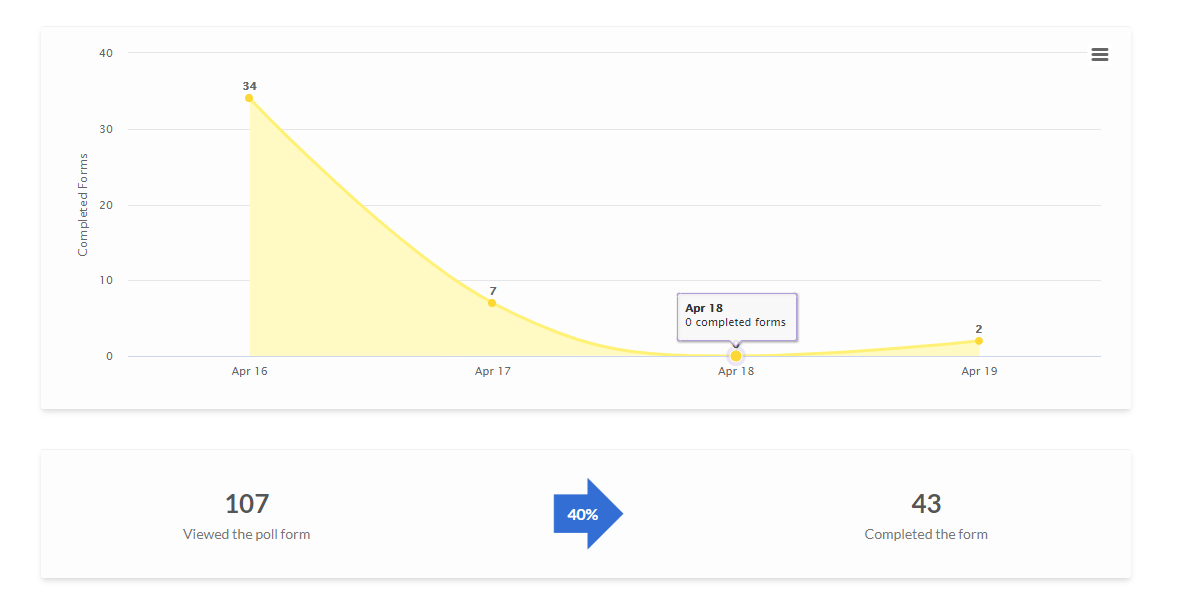
To support this, I created a survey using the so-called free application “Polls for Pages”. The survey had an n of ostensibly 43, but only the first 40 are free, and I’m super cheap, so n=40. 


My data set is self reported females, but people lie like rugs on the Internet, so who knows who answered. I am concerned that one of my answers came from my cat-dog, Milo. But, still, I press on.


Questions range from the mundane (“As an identified female, I like Rush”), to the probing (“As an identified female, I am ambivalent toward Rush”), to the outrageously provocative (“As an identified female, I dislike Rush”). I also included “Other”, for reasons unknown even to me.


This data was collected between 2021-04-16 08:04:16 and 2021-04-17 14:34:40. Learn how to read YYYY-MM-DD formatted dates, sheeple.

Findings

Raw data

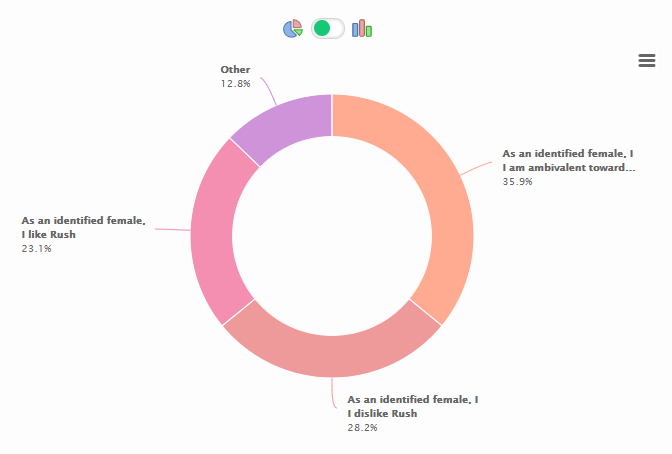
As an identified female, I like Rush   

9 votes

23.1%

As an identified female, I am ambivalent toward Rush

14 votes

35.9%

As an identified female, I dislike Rush

11 votes

28.2%

Other

5 votes

12.8%


Other 

  • While I acknowledge the technical and artistic brilliance of the band Gettys voice slays my eardrums in a bad way and Neil Peart’s political theories are stinky.

  • *WOMAN, first of all.  Second, I am Rush-ambivalent.

  • As an apparently very male, male, who was once called Smed by a very not male, male, I don’t know that I can offer anything meaningful here, but I will try my best.

  • My now husband loves Rush! So I took him to a Rush documentary on our first date. Found their lyrics to be thoughtful and cool and love that there was no line for the ladies restroom at their concerts.

Pie Chart
Bar Chart

Triangle Chart

No such thing exists. Grow up.

Conclusions

I have too much free time on my hands. I am also cheap when it comes to seeing a joke through. Finally, I should have considered the free Google forms to begin with, which is a double-duh considering how much I use the Google free applications.
Appendix


Sunday, March 28, 2021

Money Tracking Spreadsheet

 I'm now 9 years into a money tracking spreadsheet that I've designed in Google sheets, with over 27K individual transactions. As this has been super useful to me (and fun, it's kind of my hobby, tbh) around my finanical journey towards FIRE (Financial Independence, Retire Early - ok probably not the latter), I thought I'd share this out with the greater community.


This spreadsheet is designed around
  • yealry budget for "have to" expenses
  • 2 week discrentionary sprints, as that's my pay period (I'm sure it can be adapted to different frequencies)
  • categorization of transactions using US BLS standards
  • extrapolation of discretionary expenses, to get a better picture of where your money is going
I do as many transactions using credit card as possible (as long as it doesn't cost more than paying with cash). I don't like cash because allows me to see exactly where my money goes. Also, don't discount the value of rewards.

Anyway, feel free to start with my instructions document and my template spreadsheet.


Thursday, March 25, 2021

power(shell), corruption & lies: Building command line arguments

I hate typing long command lines to command line utilities. Invariably I will get one obscure path wrong and spend an hour with a copy / pasted command line in notepad to split out the components and figure out what I screwed up this time.

A lot of those long typing jobs have to do with feeding a bunch of file or directory names to an .exe

    foo_the_bar.exe --blort first\dir second\dir third\dir hey\heres\a\filename.txt

If I only had a tool that I could use to generate that list of directories and filenames.

powershell and Invoke-Expression (iex to it's friends) to the frickin' rescue.

  1. Write a powershell expression using Get-ChildItem (gci), Where-Object (?) and Select-Object (select) to build your list of things. Use -join ' ' to space separate the list of things

    PS c:\users\kpk> (gci c:\my\dir -recurse | ?{ $_.FullName -match 'some.*criteria$' } | select -expand FullName) -join ' '

  2. Use string interpolation to embed that expression with the name of the .exe you want to run. In my case, I was using cloc to (duh) Count Lines Of Code.

    PS c:\users\kpk> "cloc $((gci c:\my\dir -recurse | ?{ $_.FullName -match 'some.*criteria$' } | select -expand FullName) -join ' ')"

  3. Run that expression a few times to make sure you're happy with it. Add some command line arguments as needed.
  4. Use iex (Invoke-Expression) to run that beautiful mess.

Let's unpack the expression a bit

    PS c:\users\kpk> (gci c:\my\dir -recurse | ?{ $_.FullName -match 'some.*criteria$' } | select -expand FullName) -join ' '

  1. gci c:\my\dir -recurse |

    gci (Get-ChildItem) recurses through a directory structure. It's more complicated than that, but things often are.

  2. ?{ $_.FullName -match 'some.*criteria$' } |

    ? (Where-Object) will test each produced file & directory for a criteria. In this case, a regular expression. Only the worthy shall pass.

  3. select -expand FullName

    select (Select-Object) extracts the FullName property from the produced collection of objects and expands it to a list

  4. -join ' '

    I need that list turned into a single flattened string with space separation, because cloc wants space separation. Other command line utilities want other kind of formatting (prefixed by a magic argument, comma separated, etc.). -join's your friend here.
Once all of this is looking good, and you've prefixed it with the name of the command you want to run, iex takes care of the rest.

Never let a human do a job that a robot can do better. Ok, maybe not 'Never', but mostly. Sometimes.... Whatever.

Saturday, June 20, 2020

power(shell), corruption & lies: Tee-Object and the clipboard

Really useful powershell for me this morning. I wanted to run some commands, look at the output, and capture the output to the clipboard so I could paste it elsewhere.

Rather than run my command and then use the mouse in the comand window to copy the output to my paste buffer, like some kind of animal, I wanted to have a full powershell solution.

FOOBAR | Tee-Object -Variable c; Set-Clipboard $c

How it works:
  1. FOOBAR is the name of the command (or series of piped commands) that I want to run that write to the console.
  2. Tee-Object -Variable c takes the output from FOOBAR and passes it forward (in this case to the console output) and to the variable $c.  

    Tee-Object is kind of like a plumbing tee where data is sent in two directions. It's normally used to show output on the console and to redirect to a file. 

    Note that you say -Variable c not -Variable $c. 
  3. Set-Clipboard $c sets the contents of the paste buffer with the value in $c.

power(shell), corruption & lies: Directory Info Aggregation

To get a recursive summary of files, folders and sizes from a root directory:

$len=0; Get-ChildItem -Recurse | 
    %{ $_.GetType().Name; $len+=$_.Length } | 
    Group-Object -NoElement | ft -auto; "Total size= $($len / 1Gb) GB"

Output looks like this
Count Name
----- ----
18386 DirectoryInfo
57784 FileInfo
Total size= 25.7907013082877 GB
 
How it works:

  1. $len=0 sets the variable len to 0. No duh here.
  2. Get-ChildItem -Recurse recurses through a directory tree from the current directory. You can use the -Path option for a different root directory.
  3. %{} is the alias of ForEach-Object and is a shorthand way of looping over results that are piped from the previous command
  4. $_.GetType().Name is emitting the type of the directory entry (DirectoryInfo or FileInfo)
  5. $len+=$_.Length is summing up directory entry sizes
  6. Group-Object -NoElement is counting directory entry types from step 4 and printing them out.
  7. ft -auto automatically formats the output so that large numbers are not truncated to ellipsis (...).
  8. "Total size= $($len / 1Gb) GB" prints out the total accumulated size from the $len variable in Gigabytes.

Sunday, June 14, 2020

Spicy Miso Peanut Chickpeas

A chickepa dish that's good enough to eat without an accompanying starch (rice, naan, whatevs). 

I'd have a picture here, but the 2 times I made it, I ate it fast enough so there wasn't time. I could show you a photo of the dirty pan that I cooked it in, but nobody wants to see that.

Also, it's super fast to cook, maybe about 15m.

Ingredients
  1. Oil
  2. Grated ginger (can substitue powder)
  3. Grated garlic (can substitute powder, but do you really not have garlic in your kitchen?)
  4. Miso paste
  5. 1 can chickpeas
  6. chili paste
  7. Coconut or almond milk  
  8. Peanut butter
  9. Soy sauce
  10. Green veg that likes to cook, like bok choi, broccoli or gai lan
  11. Salt
  12. Lime.

Recipe
  1. Cook ginger & garlic in a pan with a little bit of oil over medium until the flavors release, ~ 1 minute.
  2. Prep some miso by putting 1 tbsp in a bit (1/4 cup) of hot water. stir it up so it doesn't get clumpy.
  3. Add soime drained chickpeas to the pan.
  4. Cook them up with the (now liquid) miso.
  5. Add some chili paste, to desired heat level (1/2 tsp?)
  6. Add 1/2 cup of the coconut / almond milk.
  7. Add 1tbsp peanut butter. Smile smugly if it's the natural and organic kind that your kids refuse to eat.
  8. Add some soy sauce, maybe 1bsp or so.
  9. Stir, bring to boil. Unclump that peanut butter.
  10. Add your chopped up green veg. I've been using bok choi with this, but anything that maintains a firmness & a crunch after a boil would be good here. You don't want to overcook this & get it all soggy - it's a texture thing.
  11. Cook it all together until your green veg is done and it thickens a bit. 
  12. Add some salt.
  13. Before your eat, juice half a lime onto your dish - the fresh squeezed lime pairs really well with the peanut, soy & miso flavor.

Saturday, May 2, 2020

Little Metrics: Providing Observability in our Projects


Everybody reading this should be familiar with the concept of taking your temperature. When you don't feel well, you (or Mom or Dad) pop a thermometer into your mouth, wait a few seconds, and then take a look. If you're above 98.6° F (37° C, 310.15 K, ...), you may have an infection. Note: I'm not a Doctor (but I play one on this blog).

Recording your temperature is a "little metric" around making a quick judgement around your health, and it's effortless to collect. Well, possibly not effortless for parents of toddlers (I remember those dark days), but you get the idea.

Like taking your body's temperature, we should be able to find and record some effortless "little metrics" around our software projects to make judgements about their health. This is especially true around any project that is:

  • taking more than some tiny number of iterations. 
  • split up into many tasks.
  • worked on by multiple developers.

We demand observability (one of the core -ilities) for the execution of our software, using logging libraries and monitoring services. We should also demand observability on the health of our development efforts, and present that observability in a way that everybody, from individual contributors to C-suite executives, can easily understand.

I'm deliberately wishy-washy about when to apply "little metrics". You'll know where you need it.

My "little metrics rules":
  1. The little metrics collected should be an easy concept for everybody to understand.

    A common example is number of work items (tickets) total for a project, number that are closed, and number that are active. Collecting these metrics requires everybody to be good work item citizens and follow the rules on work sizing and not reopening closed work.

    Other good examples of little metrics are cost, performance (how fast to do the thing(s)), and scalability (how many things are supported simultaneously before the system goes pear shaped).
  2. The little metrics should be small in number.

    If you start collecting and reporting 10 numbers for a project, my eyes are going to start glazing over and thinking about potato chips before you're done. 3-5 numbers sound good.
  3. Collection of the little metrics should be effortless.

    Clicking two urls is good. Clicking one is double plus good.

    The urls should show results in less than 5s. Any more, and you've lost my attention.
  4. Collection of the little metrics should use your source of truth.

    Think about where your source of truth is for tracking the work to be done. Use that. Any use of a denormalized copy of that data (like in an external spreadsheet) will be outdated as soon as you hit File > Save.
  5. Collection of the little metrics should be done in a ceremonial fashion.

    While it's great to collect these metrics via robot, incorporate their collection in your meetings, so that everybody can witness them getting collected. Playing music with their collection is optional.

    Collect and show their graphing over time (the next step) to everybody in your ceremonies simultaneously, and take a short amount of time to speak to what they mean.
  6. The little metrics should be recorded and graphed over time.

    Work tracking systems are great at showing the current state of things. What you want to see is how project health is progressing over time. Every stakeholder, from individual contributor to executive, should be able to easily see these graphs, and understand what they mean.

    If you can record these metrics and graph them over time in your work tracking system, great. If you need to copy them into a spreadsheet, that's fine too. As you're capturing the health state at a point in time, you don't risk outdated data listed in rule 4 above, because changes to the future state don't affect what is happening right now.

    In the example of total, closed, and active, it's very interesting to see a graph like this.

    but you can slice it or dice it however you want: percentages, lines towards 0 (project completion), break out active work as a separate graph, etc. Whatever is most useful to the stakeholders to gauge the "temperature" of a project.

    If total work is growing over time, then the project isn't properly scoped yet (not a pejorative - growth is bound to happen, as the unknown unknowns become known). If closed work stays flat over time, then you can see if you've got enough resources on the project. There's a ton more to be written here, and way out of scope for this blog post.
  7. The little metrics should NOT BE WEAPONIZED.

    I'm 100% serious here. This observability on the state of our projects should be collected and presented in a judgement free manner. This is using data to determine project health. Projects that need love and attention should get love and attention to get them back on track.
I see a lot of metrics in my day to day that can be hard to digest what they really mean - think "can't see the forest for the trees". I'm a firm believer that having a system like these 7 rules in place around project observability will help tremendously in building a shared understanding project health, which further fosters a collaborative development culture.